
★ pancake workflow (OR: how to solve problems only once)
• 614 words • 3 min • updated
Software Engineers / Programmers and the like have had curated dotfiles for ages.
These days (2025s), we’re evolving to times where it makes sense to curate collections of other utilities as well:
pancake is my own little repo for all sorts of CLI utilities. Its first commit was on Sep 25th, 2025, and now it’s a core part of my workflow, which is what this post will dive into.
First of all, obligatory xkcd:
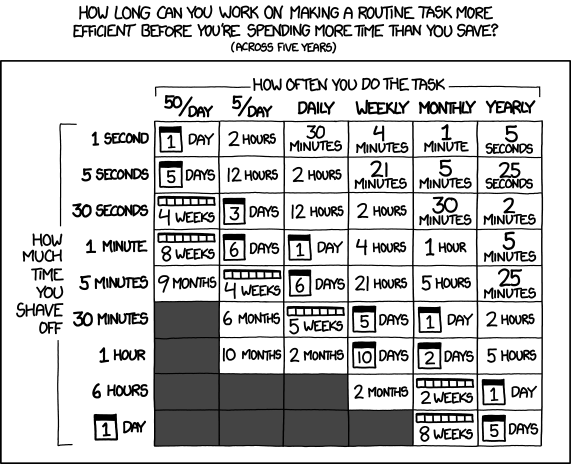
XKCD Courtesy of Randall Munroe
It became really, really cheap (in terms of time) to automate all sorts of tasks with the advent of better coding agents last year. And this totally changes the game.
Workflow #
I have a problem. An issue. A task. Let’s exemplify with today’s1 issue:
Problem statement: given a local git repository with various branches, create a worktree for each of them.
Step 1: go to the pancake repo.
% z pancakeStep 2: prompt the LLM.
❯ create a new script called "wt" (short for worktree).
  Given a local git repo, it should create a worktree for each
  remote branch. Use the same conventions as the other scripts
  in this repo (help2man compatible, -h/--help, etc).
Claude Code reads the existing scripts, matches the conventions, and writes the new one. I review it, maybe nudging it once or twice.
Step 3: commit, push, release.
% git add wt/
% git commit -a -m "new script: wt"
% git push
% just release
just release creates a CalVer tag (e.g. 2026.01.27.0), pushes it, and
GitHub Actions updates the Homebrew formula automatically.
Step 4: install it.
% just updateThis is a wrapper around brew upgrade thiagowfx/pancake/pancake.
Step 5: use it.
% cd ~/Workspace/some-repo
% wt
That’s it. Problem solved, script in the toolbox, reusable forever.
The whole cycle — from “I wish I had a tool for this” to “it’s installed and working” — takes O(minutes). The LLM does virtually everything: writes the script, follows the repo conventions, generates help text. I just steer and review.
Before coding agents, I’d weigh whether it was worth the O(hours) to write a proper script with argument parsing, help text, cross-platform support. Most of the time the answer was “no”, and I’d settle for a brittle alias or just remember the command. Now the answer is almost always “yes”.
The xkcd chart above needs to be recalibrated. The “time to automate” column collapsed by an order of magnitude, so long as you’re willing to burn LLM tokens.
As of this writing, pancake has 30+ scripts.
Some highlights:
retry— retry a command until it succeeds, with timeouts and output diffing (inspired byzsh)murder— graceful process killing with signal escalation (TERM → INT → HUP → KILL) (one step abovepkill)notify— cross-platform desktop notifications (inspired bynotify-send)timer— countdown timer with notification when donewt— the worktree script from today
Each one started the same way: a problem, a prompt, a review, a release.
The repo name is silly but the idea is practical: solve problems once. Every time I catch myself running a multi-step command more than twice or thrice, it becomes a pancake script. The cost of doing so used to be high enough that I’d only bother for frequent tasks. Now it’s so low that even a task I’ll run twice a year gets a script, so long as it’s reusable and comprensive enough.
In 2026, the compounding effect from curating your own toolbox does pay off. ∎
-
This post has been originally drafted in January 2026, but it was only finished in April 2026. ↩︎